
box by Simular Review (UK): Does Code GX5Z28DA's 5,000 Extra Credits Hold Up for AI Browser Tasks?
How box by Simular gives Claude, ChatGPT, Codex and Cursor a cloud Ubuntu desktop over MCP, what code GX5Z28DA's 10,000 starting credits buy, and the 14-day sleep wipe to watch.
Last updated 17 November 2026

box by Simular
GX5Z28DAAd / referral links — we may earn a bonus when you sign up.
Full details & steps →Best for
UK developers, solo operators and regular Claude or ChatGPT users who want an AI agent to run Chrome and shell workflows in the cloud without risking their own laptop.
A tidy way to hand AI agents a sandboxed Ubuntu desktop without renting and hardening a VPS yourself, once you factor in the 90-day credit clock and 14-day sleep deletion rule. Using our link and code GX5Z28DA before starting your first box stacks 5,000 extra credits onto the 5,000 Free signup credits — giving 10,000 starting credits (worth US$10, or around 100 Free-box hours) with no card needed upfront. Bear in mind Google blocks Gemini web custom apps outside the US (use Gemini CLI instead), and any paid S (US$19/month) or M (US$39/month) upgrade bills in US dollars.
Pros
- No payment card needed to start with 10,000 credits (~100 Free-box hours) when you apply GX5Z28DA before your first box boots
- One hosted remote MCP endpoint connects Claude, ChatGPT, Claude Code, Codex, Cursor, VS Code and Gemini CLI cleanly over OAuth
- Browser Live View with one-click Take Control handles sign-ins, 2FA prompts and CAPTCHAs without giving raw passwords to your AI
- Encrypted Secrets proxy swaps real API keys only into up to 8 allowlisted domains while container commands see only a cbv_ placeholder
- Idle Free and Plan S boxes sleep automatically instead of burning credits and wake in roughly a second while files stay intact under 14 days
Watch-outs
- Leaving a Free or Plan S box asleep for 14 days in a row permanently wipes the box, its saved files and state
- Invite and signup credits carry a 90-day expiry and cannot be cashed out; your host AI subscription still bills separately
- UK readers cannot add box as a Google Gemini web custom app (US-only rule by Google), and Claude Free caps custom connectors at one
- No separate referral T&Cs or refund policy appears in Simular's public docs; upgrades bill in USD on box.simular.ai/billing
- Secrets do not work inside agent-created boxes (box_create), only pass through shell commands and need an up-to-date box OS
Current related offer
box by Simular offer pageAd / referral links — we may earn a bonus when you sign up.
Provider
box by Simular
Give Claude, ChatGPT, Codex or Cursor a cloud Ubuntu computer over remote MCP without tying up your own laptop. Open our invite link to apply code GX5Z28DA before starting your first box and add 5,000 extra credits (worth US$5) to the Free plan's 5,000 signup credits — 10,000 starting credits (~100 Free-box hours) valid for 90 days.
Requirement: Nothing to spend: no card needed on the Free plan, just apply GX5Z28DA before launching your first box
EasyAround 5 minutes to join and connect an AI appPayout 5,000 invite credits unlock immediately once your first box boots, valid for 90 days
Verified 17 November 2026
Full claim instructions are on the box by Simular offer page.
What box by Simular is and why you would use it
Simular builds box by Simular overview as a remote Linux computer strictly for AI tools: each account starts with one persistent Ubuntu desktop running Google Chrome and a bash shell. Instead of wiring up local Playwright scripts or managing firewall rules on a bare cloud server, you add a single remote Model Context Protocol (MCP) server and let your existing chat app or coding agent browse pages, fill forms, run scripts and inspect the screen from Simular's infrastructure — documented across the full documentation.
From a UK desk, the immediate appeal is isolation and low battery drain. Running long browser loops on a MacBook ties up CPU, wakes laptops from sleep and risks accidental clicks across personal logins already signed in locally. Putting those sessions inside box keeps your main browser profiles untouched while shifting runtime load off your own hardware.
Connecting Claude, ChatGPT, Gemini CLI and coding agents
Setup depends on whether you drive box from a chat app or a local terminal. The MCP server guide points every client to https://mcp.box.simular.ai/mcp using Streamable HTTP and browser OAuth 2.0, while the install guide provides a one-line installer (npx @simular-ai/[email protected] connect) requiring Node.js 18.17+ for Claude Code, Codex, Cursor, OpenCode, Hermes, OpenClaw and VS Code. Anyone who configured box before 4 November 2026 on relay.simular.cloud/mcp should re-run connect or swap to the current URL so login does not fail.
Platform limits matter in the UK. Claude supports one-tap connectors on web, desktop and phone, though Claude Free allows just one custom connector and Team/Enterprise requires an Owner first. ChatGPT plugins must be added on a desktop browser at chatgpt.com/plugins before they work on mobile, and some workspaces disable custom MCP servers altogether. Most importantly, Google's Gemini custom apps rules limit Gemini web connectors to English personal Google accounts aged 18+ inside the United States with Keep Activity enabled — so UK users connect Gemini via Gemini CLI instead, or stick with Claude, ChatGPT, Codex (mentioning @box so it does not match Box.com) or Cursor.
What 5,000 invite credits cost and buy (worked example)
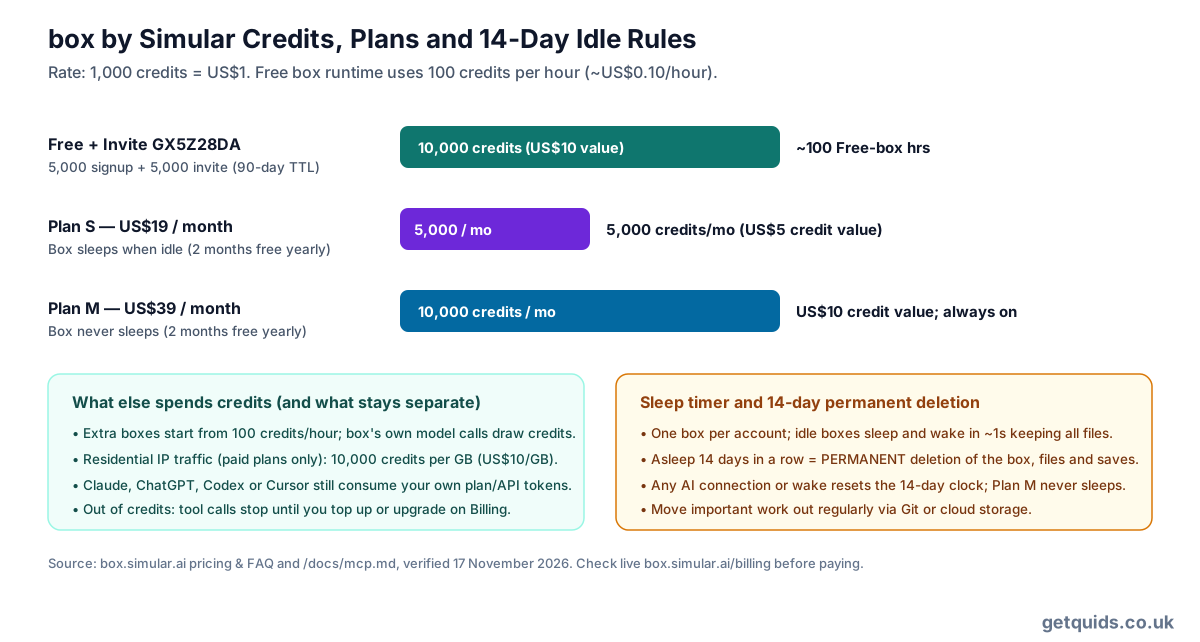
Simular prices credits transparently on the box pricing page at 1,000 credits per US$1, with top-ups and subscriptions handled behind login on Billing. A Free box spends 100 credits per active hour (US$0.10/hour equivalent), and Free accounts launch with 5,000 signup credits valid for 90 days. Applying invite code GX5Z28DA before starting your first box stacks another 5,000 credits (also valid 90 days) on top, giving you 10,000 starting credits — US$10 in compute value, or roughly 100 Free-box hours to test multi-step automations thoroughly without entering card details.
Moving onto paid plans shifts the trade-off from hourly testing to persistence. Plan S costs US$19/month for 5,000 monthly credits and puts your box to sleep when idle; Plan M costs US$39/month for 10,000 monthly credits and keeps the box permanently awake (annual billing knocks two months off either plan). Keep three extra drains in mind: additional boxes start from 100 credits/hour, box's built-in model calls draw credits, and optional residential IP routing is restricted to paid plans at a steep 10,000 credits per GB (US$10/GB). Meanwhile your own Claude, ChatGPT, Codex or Cursor usage continues billing through Anthropic or OpenAI separately, and UK bank cards without zero-FX rates will pay conversion fees on USD renewals.
Live view, Take Control and real-world friction
Where headless scripts usually choke on login walls, 2FA SMS checks or Cloudflare prompts, Live View streams the remote Ubuntu screen directly so you can click Take Control, sign in manually and hand back to your AI. In our own workflow, coding agents such as Claude Code and Codex can share box as an isolated cloud desktop for browser and GUI jobs while we step into the live view whenever an account asks for sign-in or a captcha.
Client behaviour is still uneven across apps, as detailed in the troubleshooting guide. In Claude desktop, Live View renders inline inside Chat and Code tabs but drops to periodic screenshots and links inside Cowork; Claude Code also captures a static screenshot right after opening Live View. In ChatGPT and Codex apps, Take Control opens inside ChatGPT's built-in browser (where you must sign in once) and requires clicking Refresh in app settings after a box update; Codex on Windows hits a sandbox block against ~/.codex/config.toml so you enter the URL inside Settings manually. On Free and Plan S, idle boxes sleep and wake in about one second, yet any box left asleep for 14 days straight is permanently deleted alongside every saved file and browser state.
Secrets proxy and credential hygiene
Pasting raw API tokens into chat threads exposes keys to conversation logs and web-page prompt injections. Simular's Secrets dashboard encrypts pasted credentials and exposes only a cbv_ placeholder environment variable inside the container: when an outbound request targets up to 8 allowlisted hosts (wildcards like *.example.com work), box's outbound proxy swaps in the real secret transparently, leaving any leaked echo or unauthorised request holding an inert placeholder.
There are strict operational boundaries documented in the secrets documentation. First, only commands running through box's shell tool or newly opened terminal sessions receive the placeholder — scripts executed via script_run must invoke commands through bash -lc, and pre-existing open terminals miss newly saved secrets. Second, each secret supports just one injection format (Bearer header versus URL query requires two separate secret entries). Third, secrets never populate in boxes spawned dynamically via box_create and only inject properly once the box system image is updated from box Settings.
Headless automation, CI runs and API key mode
Teams wanting scheduled runs without a person at the keyboard can pair interactive OAuth sign-in once on a desktop with non-interactive flags outlined in the headless guide. In Claude Code, passing the prompt straight after -p before --allowedTools mcp__box avoids tool-name parsing bugs (use mcp__claude_ai_box if added via claude.ai instead). For Codex CLI, scoping default_tools_approval_mode = "approve" under [mcp_servers.box] while holding box_delete at "prompt" avoids dangerously bypassing your local OS sandbox.
For continuous-integration containers or apps like DeepSeek Harness (dsh) that cannot complete a browser OAuth popup, Simular provides static Bearer keys prefixed with cb_ inside your account dashboard. Because cb_ keys grant direct MCP access and show only once on creation, inject them strictly from CI secret managers as an environment variable rather than committing JSON configs with literal keys.
How to claim 5,000 extra credits with code GX5Z28DA
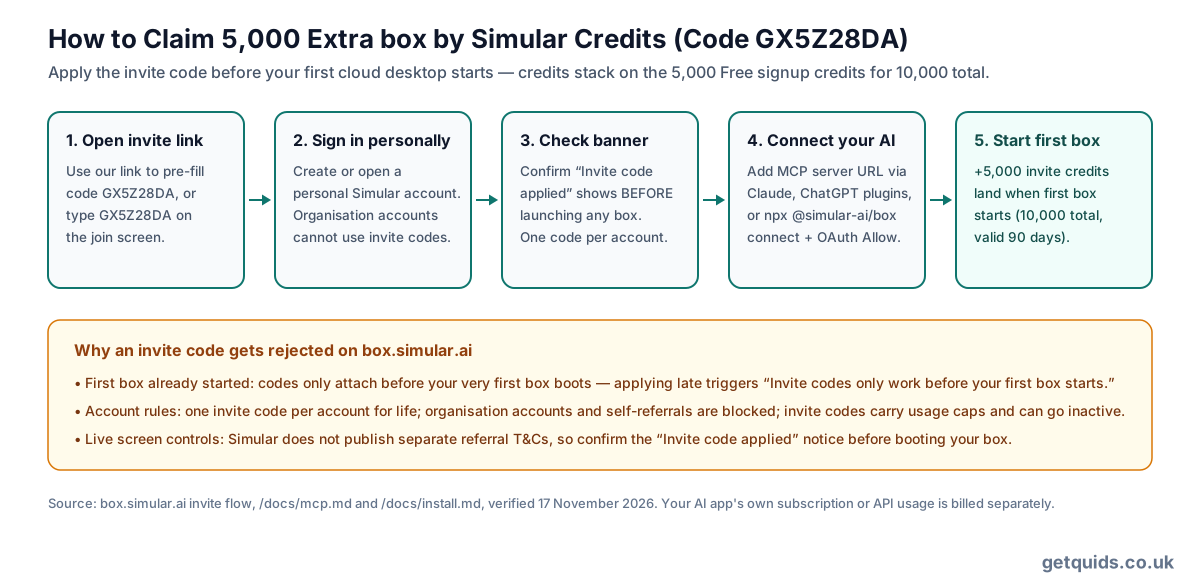
Open our Simular box invite link so GX5Z28DA pre-fills cleanly (or enter GX5Z28DA on the join page), create or sign into a personal Simular account, and confirm the banner reading "Invite code applied. You'll get 5,000 credits when you start your first box." Next, add the remote MCP server to one supported AI tool, finish OAuth approval and instruct the model to run its first browser task. Starting that very first box triggers the 5,000 invite credits immediately on top of your 5,000 Free signup credits (both valid 90 days).
Timing and account status decide whether the bonus attaches. You cannot apply GX5Z28DA retroactively once your first box has started, only one invite code works per personal account, organisation accounts and self-referrals are rejected, and invite codes carry active/use caps. Since Simular publishes no separate referral terms document or refund policy in its public docs, take the live confirmation notice at join and your Billing screen as authoritative.
Who should claim it, who should skip and how to leave cleanly
Claiming GX5Z28DA makes sense if you already use Claude, ChatGPT, Codex or Cursor and want an isolated Chrome desktop to test web tasks, scrape dashboards requiring human 2FA, or offload GUI steps without tying up your own computer. Skip it if you expect withdrawable cashback, refuse 90-day compute credit expiries, need unattended storage that lasts longer than 14 idle days without paying US$39/month for Plan M, or depend on Google Gemini's web connector outside the US.
Leaving Simular cleanly takes two minutes and should happen in order: push scripts, downloads or Chrome state out of the box first (do not wait for the 14-day idle wipe), delete saved API credentials under Secrets, revoke every linked OAuth app and cb_ bearer key inside Access settings, and cancel any paid Plan S or M renewal in Billing (support queries go to [email protected]).
FAQ
- What do I receive by joining through our link with GX5Z28DA?
- Applying GX5Z28DA on a personal account before starting your first box adds 5,000 extra credits (US$5 equivalent) on top of the Free plan's 5,000 signup credits, giving 10,000 starting credits valid for 90 days.
- Can I add GX5Z28DA after already testing a Free box?
- No. Simular only accepts invite codes before your very first box launches. Once a box starts, any attempt to enter GX5Z28DA is blocked.
- Why does Google Gemini work via CLI in the UK but not in Gemini web?
- Google restricts custom apps inside gemini.google.com to personal English Google accounts aged 18+ inside the United States with Keep Activity active. Simular itself publishes no UK geo-block, so Gemini CLI, Claude, ChatGPT, Codex and Cursor all work normally from the UK.
- How long does 10,000 credits last on a Free box?
- At 100 credits per active Free-box hour (1,000 credits = US$1), 10,000 credits equate to roughly 100 active hours within 90 days. Idle time sleeps instead of burning hourly runtime, whereas extra boxes (100+ credits/hour) and built-in model calls draw faster.
- Is Plan S worth US$19/month compared with sticking to pay-as-you-go credits?
- Plan S includes 5,000 monthly credits (US$5 credit value at standard rates) plus access to residential IPs (10,000 credits/GB), yet the box still sleeps when idle and faces 14-day deletion. Check whether paying US$19/month vs topping up credits on Billing or choosing always-on Plan M (US$39/month, 10,000 credits/month) fits your duty cycle.
- Does box expose my API keys to Claude or ChatGPT?
- Not when stored under box.simular.ai/secrets: the container only sees a cbv_ placeholder variable inside shell commands, and Simular's proxy swaps the real token solely on outbound requests to up to 8 allowlisted domains.
- What if I run out of credits mid-task or want a refund on a paid tier?
- When credits hit zero, tool calls stop with a model prompt directing you to box.simular.ai/billing to top up or upgrade. Simular publishes no public refund policy, so confirm the live billing terms on checkout before paying.